PHX Toolbox: Rigid-Body Physics in MATLAB
PHX Toolbox provides an object-oriented MATLAB API and Simulink blocks for 3D rigid-body physics. Simulation is powered by the Bullet physics engine and extended for co-simulation with custom MATLAB components.
Using PHX functions, you can easily and quickly build physical models from rigid bodies, joints, springs, ropes, force fields, sensors, and other interaction elements. The prepared model can then be simulated and visualized immediately.
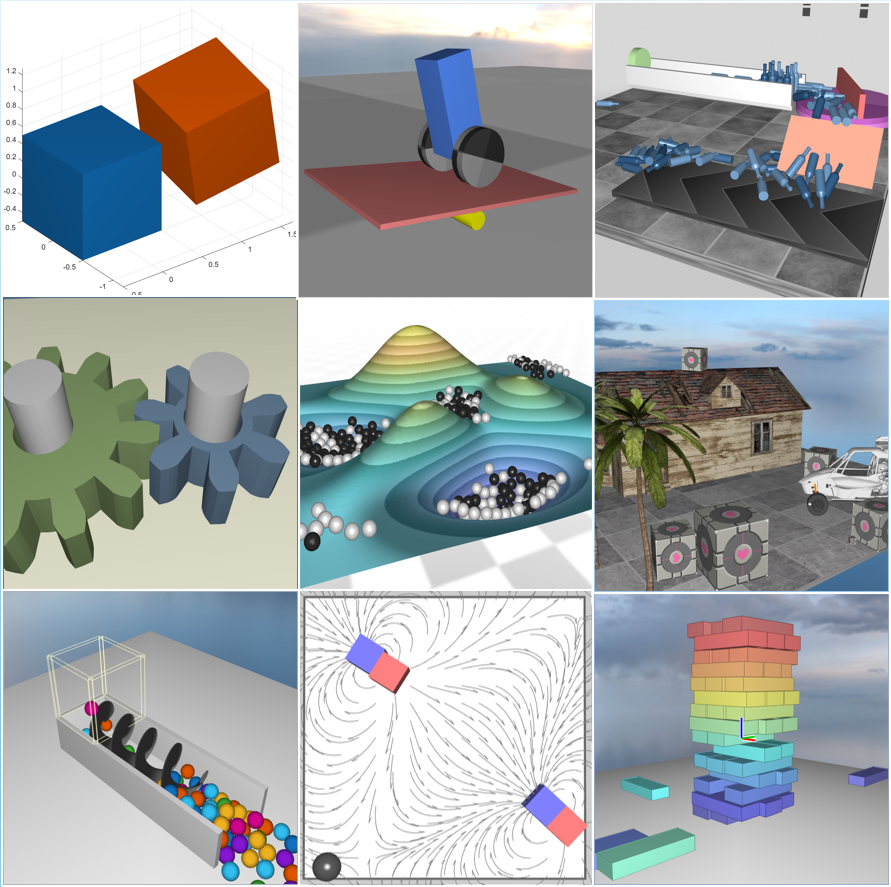
What PHX Toolbox Can Do
- 3D rigid-body dynamics with collisions and contacts between primitive shapes, terrain heightfields, and imported OBJ/STL/PLY meshes
- Joints including revolute, prismatic, cylindrical, spherical, gear and 6-DOF joints, together with springs, ropes, and motorized joints
- Force and field elements – thrusters, resistance, buoyancy, dipole and monopole fields
- Prefab assemblies – arenas, jointed chains, scattered bodies, brick walls, and URDF import
- Sensing and analysis tools – logging, trajectory traces, measurements, detection zones, and ray sensors
- Automation and visualization – timed scripts, callbacks, closed-loop control, and an interactive viewer with textures, tracking cameras, and projected shadows
- A Simulink block for closed-loop co-simulation
- Simulation without graphical output for fast calculations, batch processing, optimization, and complex experiments
What PHX Toolbox Is Useful For
PHX Toolbox is aimed at tasks where contacts and rigid-body mechanics are at the center of attention: rapid prototyping of mechanisms and robots, teaching dynamics and simulations, designing and tuning control algorithms in a closed loop with Simulink, generating data for machine learning, or simply illustrative physics experiments directly in MATLAB.
How to Get Started
The latest PHXToolbox.mltbx
package can be downloaded from the File Exchange page using the button below, or
installed directly through the Add-On Manager in MATLAB.
PHX Toolbox requires MATLAB R2025a or newer and is compatible with all platforms (Windows, macOS, Linux). Simulink is required only for the Simulink block. It also does not require an external graphics card to run.
After installation, PHX Toolbox is immediately ready to use. Over 50 ready-to-run examples are included, together with full documentation in MATLAB Help, including the Getting Started guide, User Guide, illustrated Examples gallery, and Class Reference.
Do you have a question, an idea for an extension, or are you interested in using PHX beyond the technical preview? Write to us at phx@humusoft.cz.